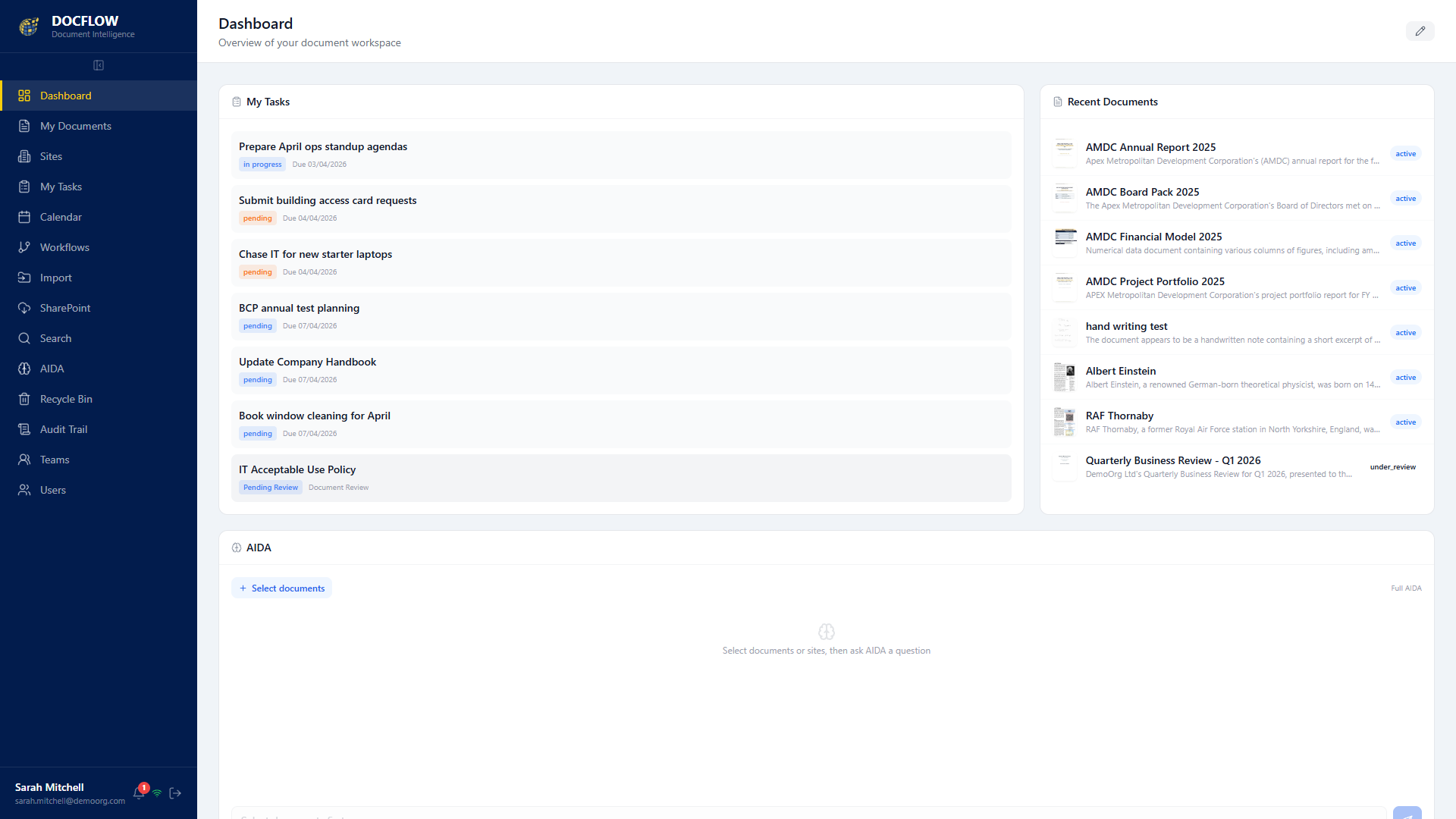
Everything you need to manage, secure, automate, and understand your documents. DocFlow is document management software that brings enterprise-grade document intelligence to organisations of every size.
DocFlow is built around nine interconnected modules that work together to give your organisation total control over every document, from creation to archive.
Manage every stage of a document's life from upload through collaboration, approval, and archive. Semantic versioning tracks every change, so you always know who did what and when. Automated retention policies ensure documents are kept or disposed of according to your compliance requirements.
Artificial Intelligent Document Automation. AIDA automatically classifies, extracts, summarises, and understands your documents, including a fully on-premises option for maximum data sovereignty. Ask AIDA questions in natural language and get instant, contextual answers.
Build multi-stage approval workflows with conditional logic, parallel approvals, and automated escalation. Pre-built templates get you started quickly, while form inputs capture structured data at every stage. Complete action logs provide full auditability of every decision.
Documents are encrypted in transit, and AES-256-GCM encryption can be applied to individual documents, optional, per document, so you can lock down your most sensitive files. With self-hosted or air-gapped deployment, your documents never leave your infrastructure, giving you complete control over data sovereignty.
Find any document in seconds with full-text search across all file types. OCR processing means even scanned documents and images become searchable. Filter by metadata, tags, date ranges, document type, or any custom field to locate exactly what you need.
Collect legally binding electronic signatures directly within DocFlow. Set signing orders, add multiple signatories, and track completion in real time. Signed documents are automatically sealed with a tamper-evident certificate and stored with a full audit trail.
Track ISO 9001, ISO 27001, NHS DSPT, CQC, GDPR, and Cyber Essentials compliance in one dashboard. Set expiry dates with automated alerts so certifications never lapse. Generate inspection-ready evidence packs at the click of a button for any regulatory framework.
Deploy DocFlow on your own infrastructure, whether on-premises or in your private cloud. You maintain full control over your data, your backups, and your security policies. No third-party data processors, no shared tenancies, and no surprises in your data protection impact assessments.
Every action in DocFlow is logged with immutable audit entries. AI-driven anomaly detection flags unusual access patterns, bulk downloads, or out-of-hours activity. Receive real-time alerts and investigate incidents from a centralised security dashboard.
DocFlow captures from any scanner, MFP, mailbox or folder, then AIDA reads each page and works out where one document ends and the next begins. Documents are split, classified and filed by their content, with no barcodes, separator sheets or manual sorting.
Scan a whole stack in one pass and DocFlow separates it into individual documents automatically. AIDA reads the content to recognise where each document starts and ends, so there are no barcodes to print, no separator sheets to insert, and no re-sorting by hand.
Bring documents in from any MFP or desktop scanner, an inbound mailbox, a watched network folder, drag-and-drop upload, or your phone. Whatever the source, it lands in DocFlow ready to be read and filed.
Every scanned page is read with OCR and made fully searchable. AIDA extracts the fields that matter, like invoice numbers, dates, totals and references, and writes them straight to the document's metadata, with no keying required.
DocFlow recognises what each document is, whether an invoice, a contract, a delivery note or a CV, and files it in the right place with the right tags. Content-based routing means there are no brittle rules to build or maintain.
Already built a process around barcodes? They still work. DocFlow reads 1D and 2D barcodes, patch codes and blank-page separators too, so you can keep what works and let the AI handle the rest.
Vendor-agnostic capture that works with your existing fleet, whether Konica Minolta, HP or any other brand of MFP or desktop scanner. No new hardware and no lock-in, DocFlow slots into the devices you already own.
Generate branded, personalised documents, from invoices and statements to letters and packs, out of your own data. Design a template once and DocFlow merges the data in to produce consistent, on-brand output every time.
Deliver the finished document however the recipient prefers, whether print, PDF, an email attachment or a secure web portal, all from the same source. One document, every channel, without rebuilding it each time.
Pull data straight from the systems you already run, from ERP and CRM to finance packages and exports in CSV, JSON or XML, so captured documents and generated output stay connected to the records they belong to.
DocFlow provides sophisticated version control that goes far beyond simple file replacement. Every document maintains a complete version history with semantic versioning, so you can see exactly what changed between any two versions.
Unlike traditional file systems, DocFlow uses virtual folders that let you organise documents by multiple criteria simultaneously. A single document can appear in multiple folders without duplication, keeping your storage efficient and your teams productive.
Collaborate on documents without leaving DocFlow. Threaded comments let teams discuss specific sections, tag colleagues, and resolve feedback in context. Every comment is timestamped and attributed, creating a clear record of decisions and discussions.
Can we update section 3.2 to reflect the new data retention policy? @James
Done. Updated to 7-year retention. Version 3.1 uploaded.
Deleted a document by mistake? DocFlow maintains a 30-day soft-delete recycle bin, so nothing is permanently lost until you decide it should be. Administrators can restore any document with a single click, preserving its full version history, metadata, and permissions exactly as they were.
When a document is deleted, it moves to the recycle bin rather than being permanently removed. All metadata, versions, and permissions are preserved for easy restoration.
Administrators can browse the recycle bin, search for specific documents, and restore them to their original location. Bulk restore operations make recovering multiple files effortless.
Set your own recycle bin retention period from 7 to 90 days. When the period expires, documents are permanently purged in accordance with your data retention policies.
Book a personalised demo with the Mastercopy team. We will show you how every feature works for your industry and compliance requirements.
DocFlow brings together AI-powered document classification (Aida), full-text and metadata search, version control, e-signatures, approval and workflow automation, granular access controls, audit trails, retention and compliance tracking, analytics, and integrations, in one self-hosted platform.
Yes. DocFlow is powered by Aida, its intelligent document processing engine, which automatically classifies and extracts data from documents and lets you query your content in natural language.
Yes. You can build no-code approval, review and routing workflows that move documents to the right people automatically, with reminders, sign-off and a complete audit trail.
Yes. With ISO 27001 and ISO 9001 certification, AES-256 encryption, retention policies and full audit logging, DocFlow is built for legal, financial, healthcare and public-sector organisations with strict compliance needs.