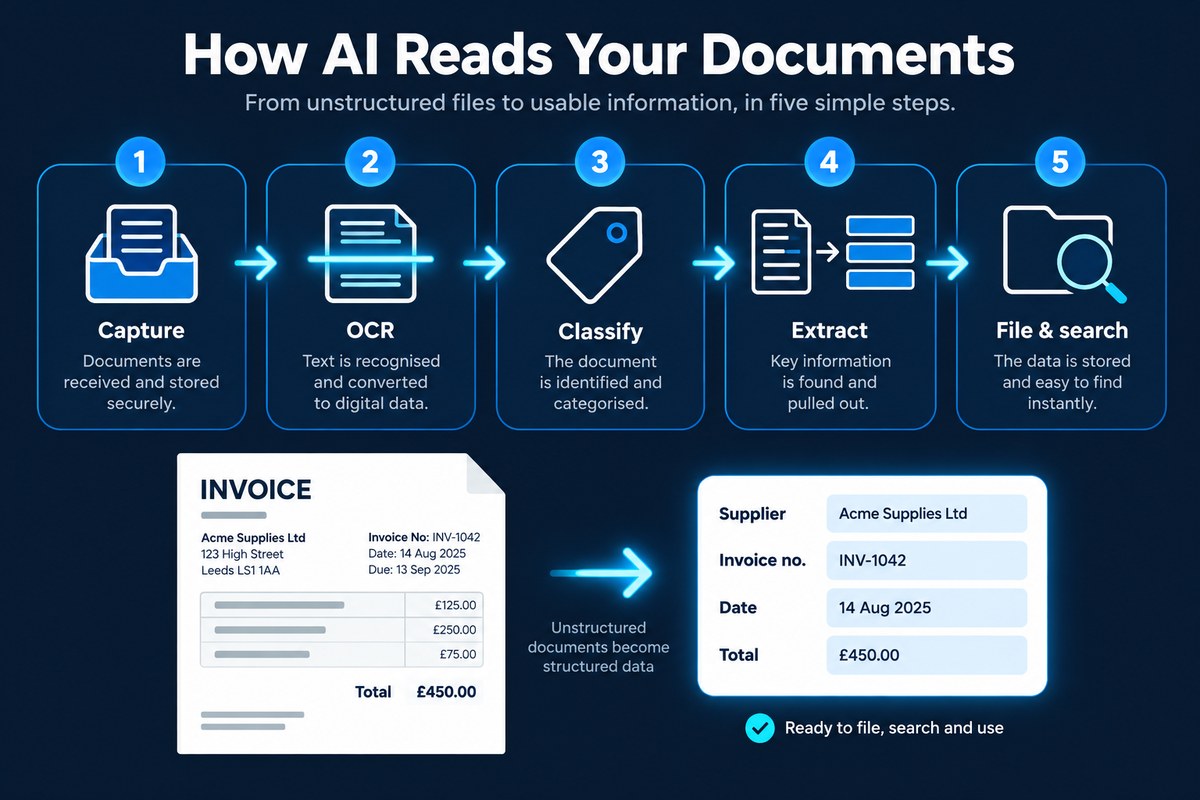
OCR (optical character recognition) converts an image of text, such as a scan or photo, into machine-readable text, but it does not understand it. Intelligent document processing (IDP) adds AI on top: it classifies the document, finds fields like supplier, invoice number and total, validates them and outputs structured data your systems can use.
"The system reads your documents automatically" has become a standard promise in business software. But to a computer, a scanned invoice is just a picture, millions of coloured dots with no words in them at all. Turning that picture into data that can be checked and approved takes several distinct steps, and understanding them helps you judge which tools will genuinely save time. This guide explains what OCR is, how it differs from IDP, how AI reads a document step by step, and what affects accuracy.
Key takeaways
- OCR turns an image of text into real, searchable text, but it does not understand it.
- IDP adds AI to classify documents and extract, validate and structure the data that matters.
- AI-based IDP is template-free, so it copes with new supplier layouts without setup.
- Accuracy depends heavily on scan quality: 300 dpi for normal text, higher for very small print.
- The best IDP systems keep a person in the loop for anything uncertain, and protect sensitive data.
What is OCR?
Optical character recognition (OCR) is the technology that recognises letters and numbers in an image and converts them into machine-readable text. Scan a letter without OCR and you have a photo of a letter. Run OCR over it and every word becomes text that can be searched, copied and processed.
OCR has existed for decades, but modern AI-based OCR is far better than the older systems many people remember. It copes much more reliably with different fonts, imperfect scans and pages that mix text, tables and logos. One point worth knowing: documents that were created digitally, such as a PDF exported from accounting software, already contain real text, so it can be read directly without OCR at all.
Why is OCR alone not enough?
OCR gives you the words, but not their meaning. After OCR, an invoice is a block of text containing dozens of numbers. OCR cannot tell you which is the invoice number, which is the VAT, which is the total, or even that the document is an invoice rather than a delivery note. Someone still has to read it and decide.
Older capture systems tried to solve this with templates, telling the software exactly where each field sits on each supplier's layout. That works until a supplier changes their invoice design, and it means setting up every new supplier by hand. That is the gap intelligent document processing fills.
What is the difference between OCR and IDP?
| Technology | What it does | What it gives you |
|---|---|---|
| OCR | Recognises printed characters in an image | Searchable, copyable text |
| ICR | Recognises handwritten characters, often in forms | Text from handwriting, with variable accuracy |
| Template capture | Reads fields from fixed positions on known layouts | Data from familiar documents, until the layout changes |
| IDP | Combines OCR with AI to understand document type, layout and meaning, without templates | Classified documents and structured, validated data |
How does AI OCR work?
- Capture. Documents arrive from scanners, multifunction devices, email inboxes, monitored folders or uploads. Where a batch of pages has been scanned together, the system works out where one document ends and the next begins.
- Clean up and OCR. Each page image is straightened, de-noised and contrast-adjusted, then converted into text, with the position of every word recorded so the layout, including tables, is preserved.
- Classify. AI looks at the content and layout to decide what the document is: an invoice, a contract, a purchase order, a payslip or a policy.
- Extract and validate. Knowing the document type, the system finds the fields that matter, such as supplier, invoice number, dates, totals and individual line items, turns them into structured data and checks that they make sense.
- File and search. The document is filed with its extracted data as metadata, fully searchable, and can trigger the next step, such as an approval workflow.
How accurate is OCR?
AI reading is very good, but it is not magic. The quality of what goes in has a big effect on what comes out:
- Scan resolution. 300 dpi is the widely recommended standard for normal text documents. For very small text, under about 10 point, 400 to 600 dpi gives better results.
- Straight, clean pages. Skewed, creased, stained or low-contrast pages are harder to read, which is why clean-up matters.
- Printed or handwritten. Printed text is read far more reliably than handwriting, especially free-flowing handwriting.
- Layout complexity. Multi-column pages, dense tables and stamps over text all make extraction harder.
- Document variety. Thousands of invoices from hundreds of suppliers, each laid out differently, is exactly where template-free AI beats older systems.
If you are digitising paper archives, getting the scanning right pays for itself. Our guides to document digitisation and document scanning services cover how.
Why keep a human in the loop?
Well-designed systems do not assume every extraction is perfect. They validate data, for example checking that line items add up to the total or that a supplier is recognised, and many attach a confidence level to each field. Anything that looks wrong or uncertain is routed to a person to confirm. Over time, the volume of exceptions falls, but the check stays in place for the documents that matter most.
Where does AI document reading pay off?
- Supplier invoices – header fields and line items captured and matched for faster, more accurate accounts payable.
- Contracts – parties, dates, renewal and notice terms pulled out and searchable.
- HR files – starter forms, right to work documents and certificates filed to the right person automatically.
- Delivery notes and purchase orders – references extracted so they can be matched to invoices.
- Paper archives – years of scanned records made fully searchable instead of sitting as image files.
Keeping sensitive documents private
Reading a document means processing its contents, so it is worth asking where that happens. Check where documents are processed and stored, whether your data is used to train third-party AI models, and what security certifications the provider holds. For highly sensitive material, an on-premises AI option means documents never leave your own environment.
Where DocFlow fits
DocFlow is powered by Aida, its intelligent document processing engine. Documents are captured from any scanner, multifunction device, mailbox or folder, and Aida reads each page, splits batches into individual documents with no barcodes or separator sheets, classifies each one, and extracts the fields that matter straight into its metadata. Every scanned page is OCR’d and fully searchable, and you can ask Aida questions about your documents in plain English. For maximum data sovereignty, Aida is available as a fully on-premises option. To see where this sits in the bigger picture, read our guide to what a document management system is, or look ahead to agentic AI for document management.
Extraction is one use of machine learning on documents. Two others are worth reading alongside it: how machine learning turns documents into insight once the data is out, and how blockchain proves a document has not been altered after it is filed.